AI HUB 사이트에 접속해서 법조문을 다운로드 받아서 웹사이트 만들어보기 실습!
데이터 준비 >> 파이썬 코드 실행하여 orcle db에 데이터 저장 >> 스프링부트에서 웹사이트 실행하기
1. AI Hub 접속하기
사이트에 접속해서 회원가입을 한 뒤에 법령 메뉴로 들어가서 원하는 법명을 검색합니다.
저는 민사법을 검색하여 "법령"만 선택하여 다운로드 하였습니다.

AI-Hub
[교통물류] 실도로 위험상황 시나리오 기반 시뮬레이션 데이터 #교통/모빌리티 조회수 36,955 관심등록 35 다운수 103
aihub.or.kr
2. 법조문 다운로드 받아서 파일에 저장
주황색 다운로드 버튼을 눌러서 원하는 정보를 다운로드 받습니다. 저는 법령만 받았습니다.

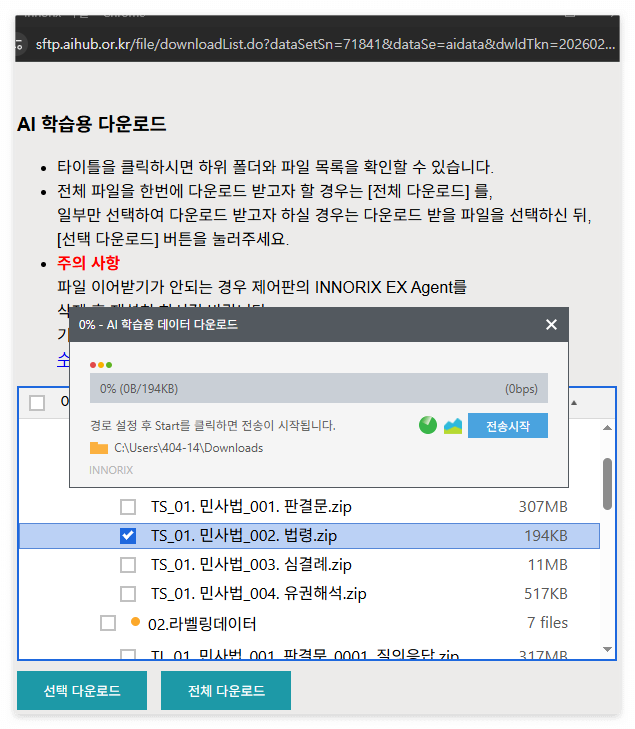
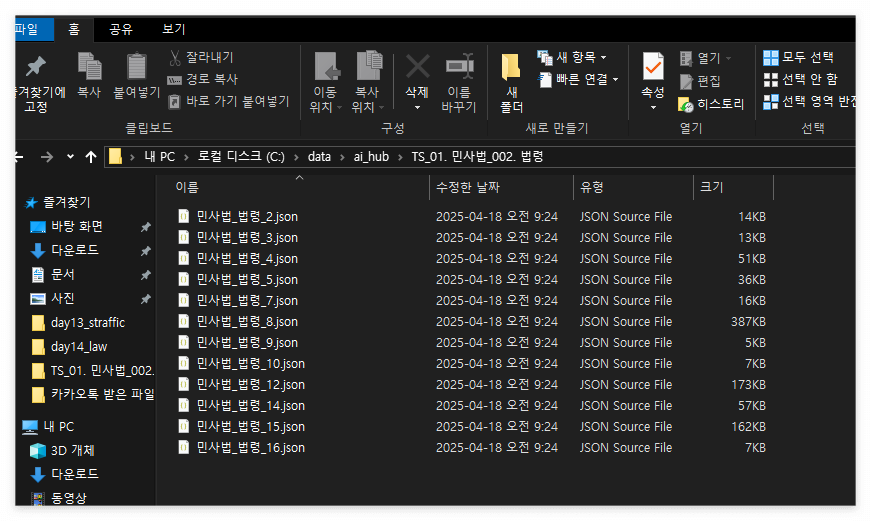
다운로드 파일은 json 형태입니다. 파이썬으로 불러올때 경로를 알려줘야 하기 때문에 아래와 같이 저장해주세요.
3. Oracle SQL Developer 실행하기
json파일을 열어보면 이렇게 법령, 시행시기, 법조문 등이 나열되어 있습니다.
이 정보를 모두 오라클 DB에 저장해줘야 합니다.
따라서 오라클에서 테이블을 만들때 jason을 참고하여 철자가 틀리지 않게 해야 합니다.


NUM // 시퀀스로 대체하겠습니다.
STATUTE_NAME //데이터는 String입니다.
EFFECTIVE_DATE //데이터는 String입니다.
PROCLAMATION_DATE //데이터는 String입니다.
STATUTE_TYPE //데이터는 String입니다.
STATUTE_ABBRV //데이터는 String입니다.
STATUTE_CATEGORY //데이터는 String입니다.
SENTENCES //데이터는 CLOB입니다. 이유는 데이터 크기가 너무 큼.
DATA_CLASS //데이터는 String입니다. ( number으로 해도 됨.)
4. 시퀀스 작성
json파일에 번호가 없더라도 테이블을 만들때는 일련번호가 있어야 합니다.
때문에, num열을 만들어주겠습니다.
파이썬 코드에 넣어도 되지만 오라클 DB에서 직접 시퀀스를 작성하여 자동으로 번호가 증가하도록 하겠습니다.

#도구 ->SQL워크시트
#시퀀스 num1씩증가
create SEQUENCE law_seq
INCREMENT by 1
START with 1;
5. 파이썬
파이썬을 실행해서 오라클 디비에 다운로드 받은 json파일을 저장하기 위해서 코드를 작성하겠습니다.
코드는.. 제미나이의 도움을 받았어요 ㅎㅎ
C:\sundo\AIpython\AI\day14_law\law.py

여기서 중요한 것은 오라클 디비와 파이썬을 연결할 수 있는 < instantclient_11_2'> 파일이 있는지 확인해줘야 합니다.!
6. 데이터 확인
파이썬을 실행하고 오라클 디비에 데이터가 저장되었습니다.
이제 이 데이터를 웹사이트에 보이도록 하겠습니다.

7. 스프링부트 실행
차례대로 코드를 만들어보겠습니다.
1.Top
<li><a href="lawlist">법조문 조회</a></li>
2.Controller
@GetMapping("/lawlist")
public String ss17(Model model){
List<LawEntity> list = lawRepository.findAll();
model.addAttribute("list", list);
return "lawListView";
}
3. Entity
package com.example.day10_image.entity;

import jakarta.persistence.*;
import lombok.AllArgsConstructor;
import lombok.Data;
import lombok.NoArgsConstructor;

@Entity
@AllArgsConstructor
@NoArgsConstructor
@Data
@Table(name="law")
public class LawEntity {

    @Id
    Long num;
    @Column
    String statute_name;
    @Column
    String effective_date;
    @Column
    String proclamation_date;
    @Column
    String statute_type;
    @Column
    String statute_abbrv;
    @Column
    String statute_category;
    @Column
    @Lob
    String sentences;
    @Column
    String data_class;
}
4.DTO
package com.example.day10_image.dto;
import com.example.day10_image.entity.LawEntity;
import lombok.AllArgsConstructor;
import lombok.Data;
import lombok.NoArgsConstructor;

@NoArgsConstructor
@AllArgsConstructor
@Data
public class LawDTO {
    long num;
    String statute_name;
    String effective_date;
    String proclamation_date;
    String statute_type;
    String statute_abbrv;
    String statute_category;
    String sentences;
    String data_class;

    public LawEntity entity(){
        return new LawEntity(
                null,statute_name,effective_date,proclamation_date,
                statute_type, statute_abbrv, statute_category, sentences, data_class);
    }
}
5. Repository
package com.example.day10_image.repository;
import com.example.day10_image.entity.LawEntity;
import org.springframework.data.jpa.repository.JpaRepository;
import org.springframework.stereotype.Repository;

@Repository
public interface LawRepository extends JpaRepository<LawEntity, Long> {

}
6. HRML <lawListView>
<html xmlns:th="http://www.thymeleaf.org">
<div th:replace="~{top::menu}"></div>
<head>
    <style>
        body {margin-bottom: 100px}
    </style>
</head>

<body>
    <div class="container">

        <h3>법조문 조회</h3>
        <table class="table table-striped">
            <thead>
                <tr>
                    <th>번호</th>
                    <th>법령명</th>
                    <th>약어</th>
                    <th>분류</th>
                </tr>
            </thead>

            <tbody>
                <tr th:each="item:${list}">
                    <td th:text="${item.num}"></td>
                    <td><a th:href="@{lawdetail(num=${item.num})}" th:text="${item.statute_name}" style="color: black"></a></td>
                    <td th:text="${item.statute_abbrv}"></td>
                    <td th:text="${item.statute_category}"></td>
                </tr>
            </tbody>
        </table>
    </div>
</body>
7. Controller
@GetMapping("/lawdetail")
public String ss18(@RequestParam("num")Long num, Model model){
LawEntity lawEntity = lawRepository.findById(num).orElse(null);
String str = lawEntity.getSentences();
    str=str.substring(2, str.length() - 2);
    System.out.println("원본 문자열: [" + str + "]");
    String[] parts = str.split("', '");
    StringBuilder sb = new StringBuilder();

    for (String s : parts) {
        sb.append(s.trim().replace("\\n", "<br>")).append("<br>");
    }

    System.out.println(sb);
    lawEntity.setSentences(sb.toString());
    model.addAttribute("item", lawEntity);
    return "/lawDetailView";
    }
8. HRML <lawDetailView>
<!DOCTYPE html>
<html xmlns:th="http://www.thymeleaf.org">
<div th:replace="~{top::menu}"></div>
<head>
    <style>th {width:120px; text-align: center}body {margin-bottom: 100px}</style>
</head>
<body>
<div class="container">
    <table class="table table-bordered">
        <caption th:text="${item.statute_name}+' 조회'"></caption>
        <tr>
            <th>법령명</th>
            <td th:text="${item.statute_name}"></td>
            <th>약어</th>
            <td th:text="${item.statute_abbrv}"></td>
        </tr>
        <tr>
            <th>시행일자</th>
            <td th:text="${item.effective_date}"></td>
            <th>공포일자</th>
            <td th:text="${item.proclamation_date}"></td>
        </tr>
        <tr>
            <th>유형</th>
            <td th:text="${item.statute_type}"></td>
            <th>분류</th>
            <td th:text="${item.statute_category}"></td>
        </tr>
        <tr>
            <th>조문</th>
            <td colspan="3" th:utext="${item.sentences}"></td>
        </tr>
    </table>
</div>
<button id="topBtn" title="Top">▲</button>
<style>#topBtn {
display: none; /* 기본은 숨김 */position: fixed;
bottom: 40px;
right: 40px;
z-index: 100;
border: none;
outline: none;
background-color: #007bff;
color: white;
cursor: pointer;
padding: 12px 16px;
border-radius: 50%;
font-size: 18px;
box-shadow: 0 2px 6px rgba(0,0,0,0.3);
transition: background-color 0.3s ease;
}
#topBtn:hover {
background-color: #0056b3;}
</style>
<script>
    // 스크롤 위치에 따라 버튼 보이기/숨기기window.onscroll = function() {
    const btn = document.getElementById("topBtn");
    if (document.body.scrollTop > 200 || document.documentElement.scrollTop > 200) {btn.style.display = "block";
    } else {btn.style.display = "none";
    }};
    // 버튼 클릭 시 맨 위로 부드럽게 이동
    document.getElementById("topBtn").addEventListener("click", function() {
    window.scrollTo({
    top: 0, behavior: 'smooth'});
    });
</script>
</body>
</html>
8. 결과


성공!
'AI딥러닝 > SporingBoot' 카테고리의 다른 글
| Query문을 잘만 쓰면 개꿀, 기본문제풀이 4개 (0) | 2026.01.12 |
|---|---|
| Query과 Interface를 이용하여 두 개 이상의 테이블 조인하기 (0) | 2026.01.12 |
| SpringBoot Thymleaf Oracle' Image CRUD+S 처리하는 법 (0) | 2026.01.10 |
| 스프링부트 엔티티와 인터페이스로 페이징 처리기술 (0) | 2026.01.10 |
| Springboot : Thymeleaf 레이아웃 코딩 시 발생할 수 있는 오류 (0) | 2026.01.09 |